Act now to save up to 60% on Cloud Hosting. Hurry, sale ends soon!
  • 00 Days
  • 00 Hours
  • 00 Minutes
  • 00 Seconds

How to Change cPanel's Style/Theme

Switching over to another cPanel theme with a different style is easy.

  • Log in to your cPanel account.
  • In the General Information panel. You should see a Theme option with a drop-down menu.
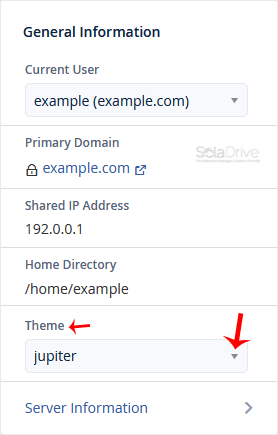
  • Choose your favorite theme from the drop-down menu, and it will apply automatically.

  • 3421 Users Found This Useful
  • Theme, cPanel
Was this answer helpful?

Related Articles

How to Reset cPanel's Account Password

If you have access to your cPanel account, follow these steps to reset your password: 1. Log in...