
 العربية
 الاستضافة
 VPS
VPS
 استضافة VPS
 ويندوز VPS
 سيرفرات VPS مُدارة
 السيرفرات
  السيرفرات المخصصة
 سيرفرات الشركات
 النطاقات والبريد
 تسجيل نطاق
 نقل نطاق
 خدمات الشركات
 الدعم الفني
 فتح تذكرة
 الاتصال بنا
 قاعدة المعرفة
 الأخبار
 الشركة
 GlobeTier OS
 الشروط
 سياسة الخصوصية
 سياسة الاسترداد
1. Log in to your cPanel account.
2. In the Databases section, click on MySQL Databases.

3. Under Current Databases, you can see a list of all your databases. Locate the database you want to remove and click on Delete.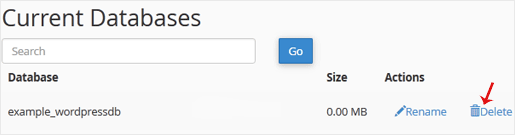
4. Click on Delete Database.
1. Log in to your cPanel account.
2. In the Databases section, click on MySQL Databases.
3. Under Current Databases, you can see a list of all your databases. Locate the database you want to remove and click on Delete.
4. Click on Delete Database.
